
800 chairs. The same shapes, positions and detail. Yet one IFC file is about 132 times smaller. The difference is how often the geometry is stored.
For this article, we modelled a chair in Blender, produced three IFC variants and checked the files after reopening them. The result: 89.43 MB with separate geometry for each chair versus 0.68 MB with one shared geometry definition. Assigning a type alone did not produce those savings.
Type assignment and shared geometry are different mechanisms
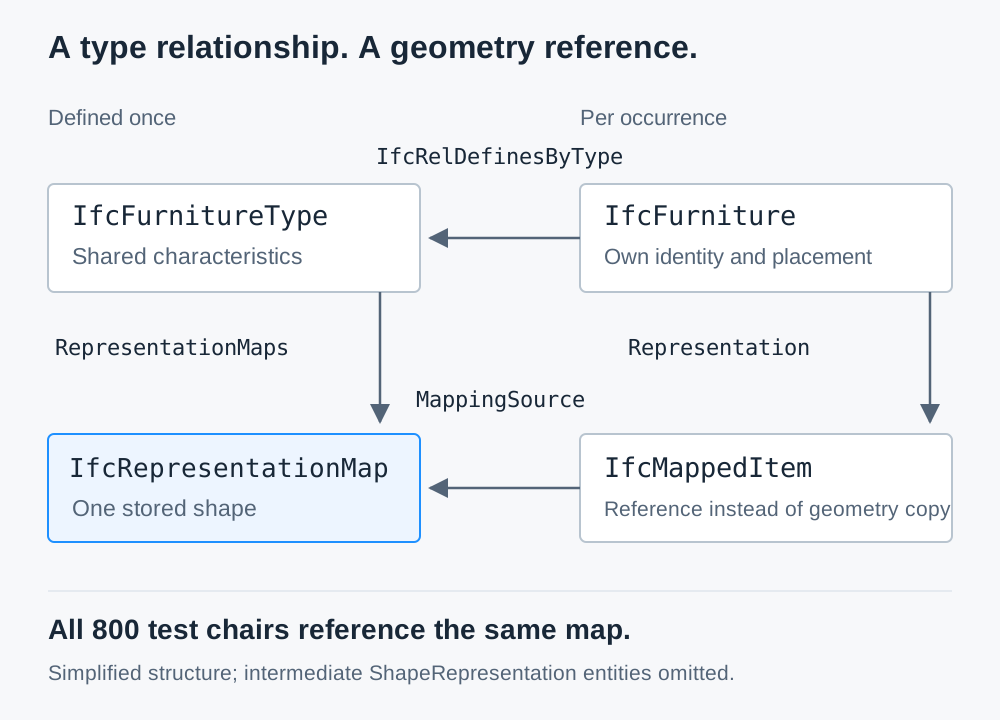
A type describes common characteristics of a product, such as a chair model represented by IfcFurnitureType. An occurrence is an individual IfcFurniture chair with its own identity and position. IfcRelDefinesByType connects the occurrences to their type.
This relationship identifies which elements belong to the same type. It does not replace geometry. A type can have no geometry of its own. Its occurrences can then have individual shapes, such as elements with different lengths but the same construction.
Reusing a complete shape involves a second mechanism:
IfcRepresentationMapholds a shared representation and its reference coordinate system.IfcMappedItemreferences that definition and maps it into the occurrence's local coordinate system.ObjectPlacement, often anIfcLocalPlacement, places the element in the model. Its complete position depends on the placement chain and the mapping transformation.
A product type can hold these definitions in RepresentationMaps. Where they exist, the occurrences must reference them accordingly. Conversely, a map can share geometry without a type object. Sources: IfcTypeProduct, IfcRepresentationMap.
Properties also need a precise distinction: a type holds property sets in HasPropertySets. An occurrence can override a type property by defining the same property in a property set of the same name. Materials are associated through IfcRelAssociatesMaterial; some material models require additional occurrence information. Changing a type therefore does not override every local value. Sources: IfcTypeObject, IfcRelAssociatesMaterial.
The real test: 800 chairs in three IFC files
Our purpose-built Blender chair has a seat, backrest, tubular frame and feet. Its triangulated geometry contains 1,344 vertices and 2,620 triangles. We created 800 occurrences with identical positions and rotations across all three variants.
The test uses Blender 5.1.0, Bonsai 0.8.5 and IfcOpenShell 0.8.5, with the IFC4X3_ADD2 schema. The comparison exporter is a Python script running inside Blender. It writes the meshes as IfcTriangulatedFaceSet and uses the IfcOpenShell API for type assignment and geometry mapping. A separate test exercises Bonsai's authoring operators directly.
| Variant | Types | Geometry maps | Tessellations | File size |
|---|---|---|---|---|
| A: separate geometry per chair | 0 | 0 | 800 | 89,432,583 bytes |
| B: one type, still separate geometry | 1 | 0 | 800 | 89,432,643 bytes |
| C: one type with shared geometry | 1 | 1 | 1 | 679,252 bytes |
Every variant contains 800 IfcFurniture occurrences. Variant C contains 800 IfcMappedItem entities referencing the same map. Type assignment alone makes B slightly larger. Only C reduces the file size by 99.24% compared with A.
These are uncompressed IFC STEP files; 1 MB means 1,000,000 bytes. The figures describe this deliberately repetitive test model. Different shapes, properties, export settings and IFCZIP compression change the ratio.
What we checked after export
A small file and a convincing image are not sufficient. We reopened all three written files and checked:
- Schema: IfcOpenShell validation including EXPRESS rules, with no reported issues.
- Identity and containment: 800 chairs in each file, valid and unique GlobalIds, metre units and building storey containment.
- Geometry and placement: coordinates and triangle indices of every stored tessellation match the source Blender mesh. All 800 placements match their expected transforms.
- References: in C, each chair references its type's map. The mapping transforms are identity transforms here; position and rotation are in
ObjectPlacement. - Geometry processing: the IfcOpenShell geometry engine produces 2,620 triangles for every chair. World bounds match the expected values within the test tolerance of 0.000001 m.
We also imported C into Bonsai, saved it as IFC and checked it again. All 800 occurrences and the shared definition survive. On import, the 800 Blender objects use one shared mesh datablock.
Separately, we used Bonsai to create an IfcFurnitureType from the Blender mesh and generate twelve occurrences. The saved file contains one map and twelve mapped items, and passes schema and geometry checks.
These checks cover this test case with IfcOpenShell and Bonsai. They are neither certification nor a substitute for importing into your receiving application. Clash detection, properties and project requirements need separate checks. Source: IfcOpenShell validation.
Reproduce the test: Download IFC files, reports and scripts. The package includes the compact IFC, the Bonsai round-trip export and the direct Bonsai authoring example. The script regenerates the two large comparison files.
The verified Blender and Bonsai workflow
For a chair with a fixed shape, this workflow works in the tested version:
- Create an IFC project. Set the schema and units. Our test uses IFC4X3_ADD2.
- Model one element. Check its scale and local origin. Initially, the geometry is a Blender mesh.
- Assign the type class to that mesh. Here, use
IfcFurnitureTypewithPredefinedType=CHAIRand a Body representation. Bonsai creates the type's geometry map. - Create occurrences from the type. The tested Bonsai operator is
bim.add_occurrence. It creates distinct IFC elements with type and geometry references. - Save and reopen the IFC. Check references, counts, positions and geometry.
The Type Manager lets you manage these types; the interface depends on the Bonsai version. Alt+D alone does not prove correct IFC instancing: a shared Blender mesh datablock and the relationships in the IFC file are different data structures.
For existing elements, assigning a type with geometry can replace their previous shape with the type geometry. Check variants, openings, dimensions and local changes before assigning a type in bulk.
We practise this workflow, managing types and property sets, and checking the written IFC in course B of our Blender and Bonsai training, using your own models.
For automation, the order matters. In this snippet, the model, chair occurrences and their placements already exist:
import ifcopenshell.api.geometry
import ifcopenshell.api.root
import ifcopenshell.api.type

chair_type = ifcopenshell.api.root.create_entity(
    model,
    ifc_class="IfcFurnitureType",
    predefined_type="CHAIR",
    name="Chair A",
)

# Attach the existing body representation to the type first.
ifcopenshell.api.geometry.assign_representation(
    model, product=chair_type, representation=chair_body
)

# Map the type geometry onto the occurrences.
ifcopenshell.api.type.assign_type(
    model,
    related_objects=chairs,
    relating_type=chair_type,
    should_map_representations=True,
)

model.write("chairs.ifc")
chair_body is an existing IfcShapeRepresentation in the Body context. Without a geometry map on the type, assign_type cannot create a shared shape. The test package contains the complete executable example. Source: IfcOpenShell assign_type.
When the method helps
Repeated shapes suit geometry reuse, including furniture, lights, fasteners and identical prefabricated elements. Different positions and rotations are no obstacle.
Types remain useful when geometry differs. Walls with the same layer composition can share a type while having different lengths. The shared technical definition is a benefit in its own right.
Unique elements, terrain and individually surveyed shapes may offer little geometry to share. Excessive tessellation, extensive data or unused content can also cause large files.
A smaller IFC does not guarantee a proportionally faster viewer. Reusing geometry in RAM or on the GPU depends on the application. We did not benchmark loading times, memory consumption or frame rates.
Check the exported result
Do not rely only on the total number of maps and mapped items. An element may have several representations, and mappings can be nested. Inspect actual reference chains, shapes and placements after export.
The chair test demonstrates the potential under clear conditions: store identical geometry once, reference it 800 times and verify the written IFC. The type relationship provides the technical classification; shared geometry produces the file savings here.
Bimatic supports model structure, automated IFC processing and verifiable exports. Talk to us about your model.