
Bimatic GmbH Logo
Home
All servicesAs-built model (Scan to BIM)Blender and Bonsai training
CoffeeBIMCyclone 3D SuiteWeb DesignOpenSource
ProjectsBlogAbout BIMAboutFAQ
Contact
|

BIMATIC

From Fundamentals to Automation. Support that Brings Success

Jan Sigrist · Owner | BIM Specialist

jan.sigrist@bimatic.ch

Services

  • As-built models from point clouds
  • Blender and Bonsai training
  • BIM Automation
  • IoT Integration
  • Visualizations

Products & Tools

  • CoffeeBIM
  • Cyclone 3D Suite
  • OpenSource
  • About BIM

Company

  • About
  • Projects
  • Blog
  • FAQ
  • Contact

© 2026 Bimatic GmbH. All rights reserved.

Legal NoticePrivacy Policy
  1. Home
  2. Training

Blender and Bonsai training for infrastructureBlender BIM training: learn openBIM on your own models

Bimatic GmbH trains your team in Blender and Bonsai (formerly BlenderBIM) anywhere in Switzerland, in-house or remote. You learn to author, check and edit IFC models natively, using data from your ongoing projects. The trainer answers your questions directly, instead of you searching forums for answers. The focus is on infrastructure: roads, utilities, terrain and civil structures.

Request trainingView courses
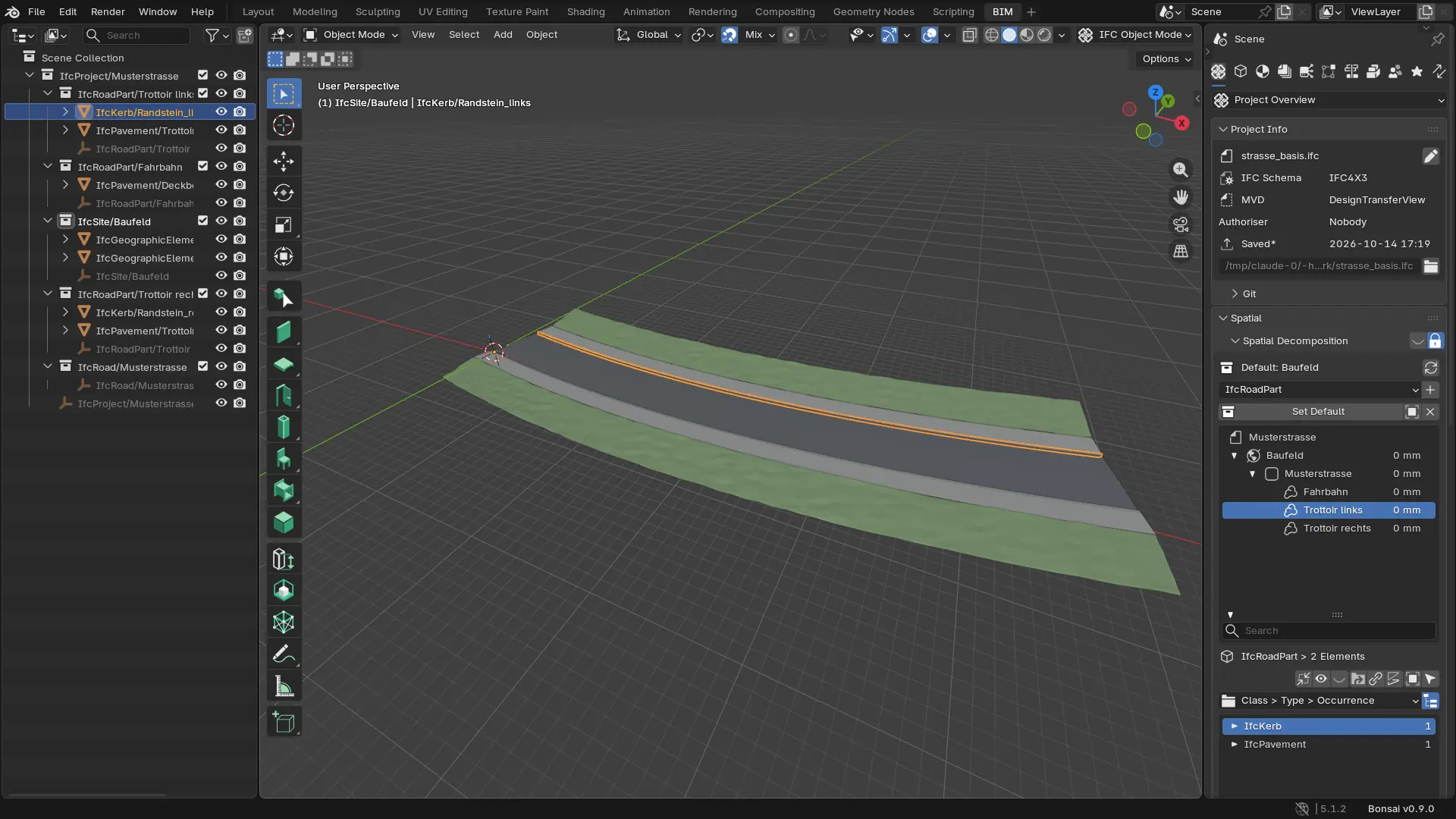
Screenshot from Blender with Bonsai: road model with an IFC structure of IfcSite, IfcRoad and IfcRoadPart
Blender and Bonsai, developed in the open
Open source
edited natively, no conversion
IFC 4.3
questions go straight to the trainer
Guided
or remote, in-house with your team
On site
01

Three courses, building on each other

Course A lays the foundation for geometry, course B for IFC data, course C for working with AI agents. Book the courses individually or as a sequence. A half day on visualisation with rendering, camera flights and GLB export can be added. All courses are geared to infrastructure. Bonsai's building-construction tools, such as parametric walls, slabs, spaces and drawing generation, are not part of the courses.
Course A

Modelling and correcting geometry

You move confidently in Blender, edit geometry precisely and correct existing models in a targeted way. This includes IFC models from your projects, which you open, adjust and place correctly with Bonsai.

Duration
2 days
Level
Beginner, no prior knowledge
For
Drafters, designers and BIM specialists in infrastructure

Contents

  • Interface, navigation, selection, Outliner and collections
  • Working precisely: numeric input, snapping, 3D cursor, origin and units
  • Creating geometry: primitives, curves, profiles and modifiers
  • Modifying geometry: Extrude, Inset, Loop Cut, Bevel and Boolean
  • Large coordinates in LV95: project origin and accuracy
  • Import and export: DXF, OBJ, FBX and glTF/GLB
  • Loading IFC models: third-party models usually contain rigid geometry, so you edit the mesh
  • Correcting faulty elements such as retaining walls, shafts and pipes, placing objects again with placement and container
  • Exercise: model an element from a drawing and correct an existing infrastructure model

Afterwards you can: Create and change geometry precisely, correct faulty elements in IFC models and hand over objects correctly placed.

Request this course
Course B

IFC data, structure and checking

You work directly in IFC. Bonsai writes every change to the IFC file, with no export step and no data loss.

Duration
2 days
Level
Intermediate, after course A or with basic Blender skills
For
BIM coordinators, modellers, client representatives

Contents

  • The Bonsai principle: working natively in IFC and how it differs from Blender meshes
  • openBIM basics: IFC schema, entities, types and property sets
  • Setting up the project and spatial structure for infrastructure in IFC 4.3: IfcSite, IfcRoad, IfcFacilityPart
  • Maintaining attributes, property sets, classifications and materials
  • Checking and setting georeferencing: LV95 and IfcMapConversion
  • Creating new IFC elements from meshes
  • Checking models with the Information Delivery Specification (IDS) and exchanging issues in the BIM Collaboration Format (BCF)
  • Merging and splitting models with IfcPatch
  • Exercise: analyse, correct and check a faulty IFC delivery

Afterwards you can: Check, correct and enrich IFC models on your own, independent of the authoring tools your project partners use.

Request this course
Course COn request

AI agents for IFC workflows

You connect Blender and Bonsai to an AI assistant through the Model Context Protocol (MCP) and learn where this helps in daily project work and where it does not. We update the workshop continuously because the tools evolve quickly.

Duration
1 day
Level
Advanced, IFC knowledge and Python basics
For
BIM specialists who automate workflows

Contents

  • Setting up MCP with Blender and Bonsai
  • The agent writes scripts instead of clicking: traceable and repeatable
  • Read only first, narrow tools instead of free code execution
  • Tracking every change in Git and with IfcDiff
  • Checking loop with IDS and validation
  • Project context as a file, sending excerpts instead of whole models
  • Data protection: Swiss Federal Act on Data Protection (FADP), confidentiality and approval by your clients
  • Realistic expectations: strong with data, weak with spatial tasks
  • Practical example: the open source add-on Claude BIM Assistant

Afterwards you can: Use AI agents in IFC workflows in a controlled way, with traceable changes and clear responsibility resting with the specialist.

Request this course
02

A real-world workflow: the road

This is what a typical workflow in the course looks like, from breaklines to the merged IFC model. The animation is rendered in Blender. Click a step to jump straight to it.

Step 01 / 08

Import breaklines

The breaklines arrive in Blender as 3D polylines: road axis, carriageway edges, sidewalk edges and embankments.

03

Open source, personally guided

Guided, not self-study

There are plenty of tutorials. In the course you ask the trainer directly, on your own models, and get an answer right away.

One environment for many tasks

Author, check and edit IFC in one tool. For many checking and fixing tasks you no longer need a separate licensed program.

Strong community

Bonsai and IfcOpenShell are developed in the open, with regular releases and an active community on the OSArch forum. Bug reports and requests go straight to the developers.

Automatable with Python and AI

Script recurring tasks with IfcOpenShell or have an AI agent run them via MCP, with you checking the result. What you learn in the courses is the basis for your own workflows.

04

A format for your needs

We adapt content and pace to your team. You receive pricing with the offer after the initial call.

One-to-one training

1:1, in half days, remote or on site

Personal training on your own models. Between half days you practise on your own project for one to two weeks. Also available by the hour as coaching on a specific model.

Company training

In-house, up to 8 participants

Your team learns together at your premises, optionally with exercises built from your project data. From 9 participants, up to 12, we add a second trainer.

Open online course

Online, 4 to 8 participants, dates on request

You learn live online together with specialists from other companies, without travelling. The courses can also be booked individually.

05

How the training works

  1. 01

    Initial call

    We clarify prior knowledge, software environment and the tasks your team needs to handle.

  2. 02

    Course plan with your data

    You provide one to three sample models at least two weeks in advance. We build the exercises from them.

  3. 03

    Training

    Short inputs, lots of practice. All participants work along on their own computer.

  4. 04

    Follow-up on demand

    You receive the materials and exercise data. Collected questions from practice are resolved in an optional follow-up session you can book: two hours remote, within two months.

06

Your trainers

Our training is led by specialists who work with Blender, Bonsai and IfcOpenShell on infrastructure projects every day. They know the questions from everyday project work because they solve them themselves.

  • Hands-on use of Blender and Bonsai in daily project work
  • Background in infrastructure construction and BIM
  • Experience with openBIM workflows and IFC 4.3
  • One dedicated contact from preparation to follow-up
07

Frequently asked questions

What prior knowledge do I need?

None for course A. Course B requires course A or equivalent Blender skills: navigation, selection and transforming. For course C you need IFC knowledge and Python basics, for example from course B or from your project work.

Are the courses suitable for building construction?

The courses are geared to infrastructure: roads, utilities, terrain and civil structures. Bonsai has its own tools for building construction, such as parametric walls, slabs, spaces and drawing generation. We do not cover them. The basics of geometry, IFC structure and checking from courses A and B apply to building models as well.

What does Blender MCP add to the course?

The Model Context Protocol (MCP) connects Blender and Bonsai to an AI assistant such as Claude. You describe a task in your own words, the agent writes a script for it, and you check the result in the model. In course C we set up the connection together and practise where it pays off and where you are better off modelling yourself. Responsibility for the model stays with you.

What hardware do participants need?

A current Windows, macOS or Linux laptop with a dedicated graphics card, at least 16 GB of RAM and a mouse with a middle button. You install Blender and Bonsai beforehand following our guide. One week before the training we check the installation together online.

Can Bonsai replace our existing checking and editing tools?

For many tasks, yes: checking IFC models, testing them against requirements with IDS, enriching properties, detecting clashes and fixing errors. For specialised rule sets an existing checking tool may still make sense. In the initial call we work out which tasks your team will cover with Bonsai.

Can we use our own project data?

Yes, we recommend it. Your data stays with you. If required, we sign a non-disclosure agreement beforehand.

Do participants receive a certificate?

Yes. All participants receive a course confirmation listing the topics covered and the number of hours.

What happens if I cannot attend?

In the open course a substitute can take your place at any time. One-to-one and company trainings are rescheduled by arrangement. The exact terms are stated in the offer.

Ready for openBIM in your own team?

Tell us which models your team works with. You receive a course proposal with contents, duration and price.

Request trainingOpen-source projects